Maximising your number of claimed JustGiving pages is one of the simplest and most effective ways to significantly increase income for your virtual challenge. It’s not just a technical step, it’s a crucial part of your participant’s fundraising journey.
The difference it can make is absolutely huge.
In 2025, the average amount raised per claimed page was £158, compared to just £5 for unclaimed pages. That’s a significant gap, and a clear opportunity.
If you want to drive more value from your campaigns, improving your claim rates should be a priority. We work closely with our charity partners to ensure this happens. Our Head of Virtual Challenges, Livvy Ellison, shares our best practice advice in this blog.
“First, it’s important to understand what ‘claimed’ Justgiving pages are. When a participant registers to take part in your challenge, they can opt to set up a JustGiving page as part of this process, this is through the JustGiving integration on GivePanel.
GivePanel will create a custom page for your participant. One of the key steps a participant must take is to ‘claim’ their page so that the fundraising page they have set up is linked to their JustGiving profile.
To do this they must either login to their existing JustGiving account to link their page or set up a new one if they don’t already have one. If they don’t take this step the page is left ‘unclaimed’.
Although claimed and unclaimed JustGiving pages is common terminology across our sector it’s really important to avoid jargon when talking to your participants to make this step as simple as possible. You will see in our hints and tips below that we use the term ‘linking’ to make this step more understandable for your participants.
1. Add a Clear Prompt to claim your page in GivePanel
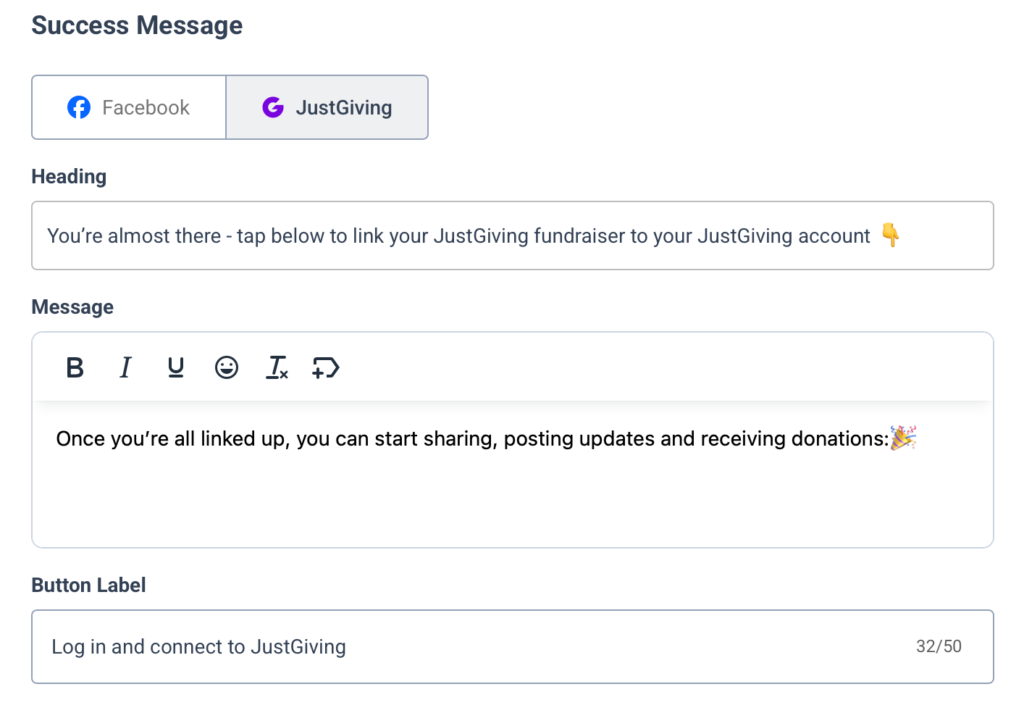
When a participant registers and creates a fundraiser via a GivePanel form, they’re presented with a success message. This is your first opportunity to drive action, so it’s important to make it count.
Head into your campaign settings and update your success message to include a strong, visible prompt encouraging participants to claim their JustGiving page.
Make sure to:
- Use clear, direct language and avoid jargon
- Include an action-led button (e.g. Log in and connect to JustGiving)
Call to action focus: Prompt immediate action to claim their page as the next step while motivation is high.
2. Optimise your automated JustGiving page set up email
Speed matters. So the sooner you follow up, the more likely participants are to complete the process.
GivePanel now has the option to send an instant email to participants when they create their fundraising page – this is in addition to the normal email journey.
Ensure both your Facebook and JustGiving email templates are switched on so participants receive a message as soon as they create their fundraiser.
Your email journey needs to do more than inform people, it needs to drive action.
Start with a subject line that creates urgency and signals importance. Then make sure the content is clear, supportive and very easy to follow.
Include:
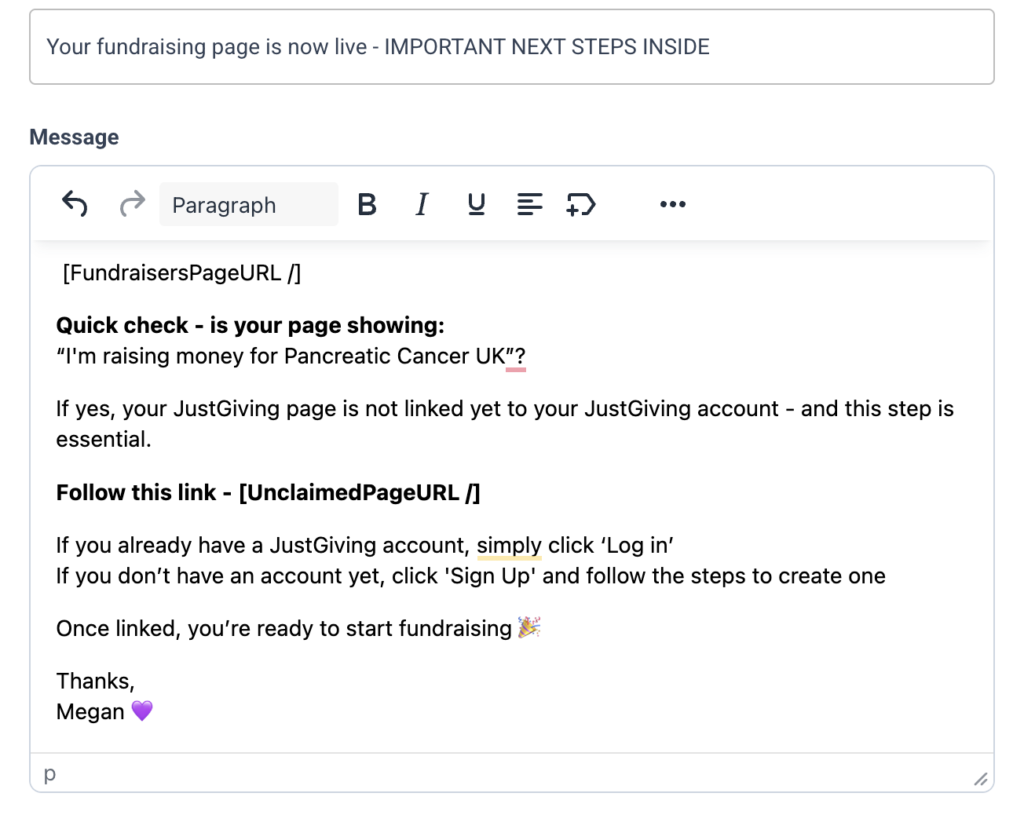
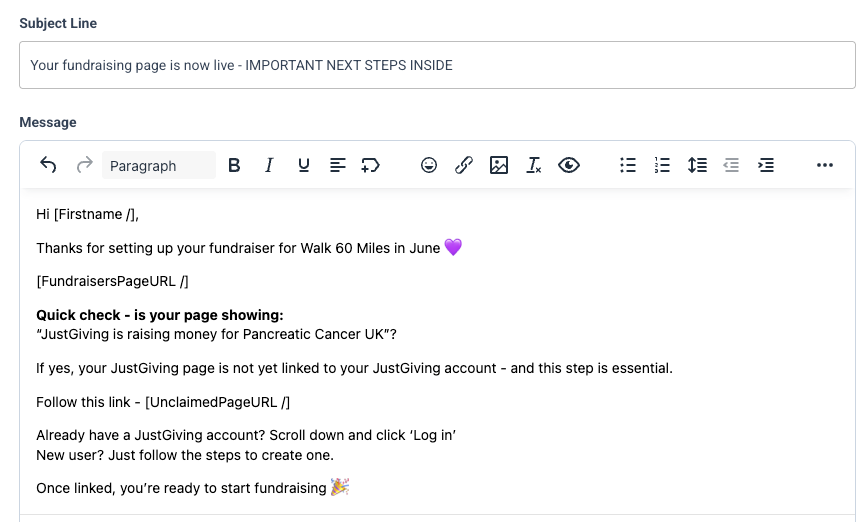
- A thank you and confirmation their page is live
- A prompt to check if their page is correctly linked to their JustGiving account
- Explain that linking is essential to start fundraising successfully
- A direct link to complete the step
- Simple instructions for both new and existing users
Call to action focus: Get participants to log in and fully claim their fundraising page so they can start fundraising.
4. Front-Load Your Stewardship Journey
When it comes to driving actions like page linking, timing really is everything.
Don’t be afraid to email participants on consecutive days straight after registration. Creating a sense of urgency early on can dramatically improve your claimed rate.
We recommend:
- Day 0: Immediate post-registration email
- Day 1: Reminder
- Day 2: Follow-up
- Day 3: Final nudge
Keep your messaging clear, concise and action-focused throughout.
Call to action focus: Build urgency and momentum in those critical first few days.
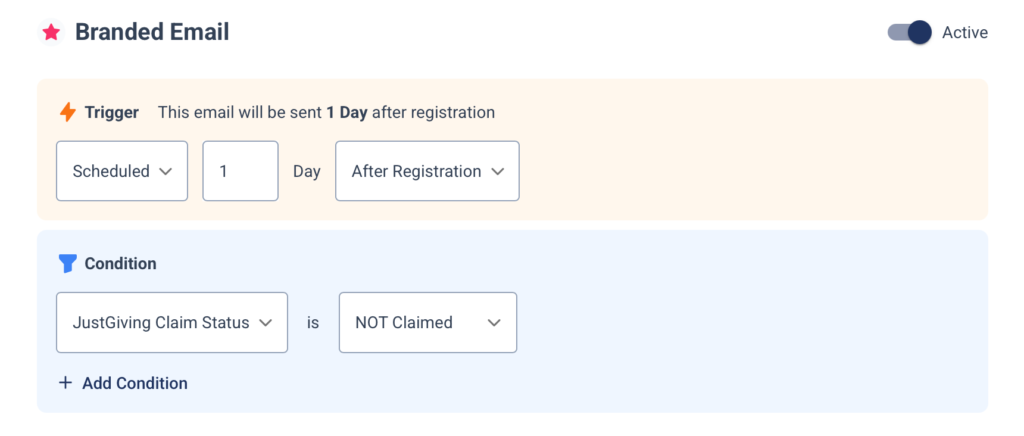
Top tip: Set the condition on these emails to ‘JustGiving Claim Status’ is ‘NOT CLAIMED’ to ensure you are targeting the right people.
5. Use Your Facebook Group to Spot and Support Unclaimed Pages
Your Facebook group is a powerful tool for identifying and resolving unclaiming JustGiving pages.
During the recruitment stage, share a post highlighting what an unclaimed page looks like, and invite participants to ask for help.
We recommend posting this at least twice and using @everyone to maximise visibility.
Example copy:
Using JustGiving? It’s time to check your page ✅
If you’ve set up a JustGiving page, check it quickly. Does it say “I’m raising money for CHARITY”?
If it does, your page isn’t fully linked to your JustGiving account yet. This step is really important 🚨
It only takes a few seconds, and if you’re unsure, pop a comment below – we’re happy to help! 🙌
P.S. If you’re using a Facebook fundraising page, good news – you’re all set! 💙
Call to action focus: Make it easy for participants to self-identify and fix the issue, with support on hand.
Final Thoughts
Improving your JustGiving claimed percentage isn’t about one big change, it’s about getting the small moments right across your supporter journey.
Clear prompts, timely follow-ups, and simple guidance can have such a huge impact.
And when the difference is £158 vs £5 per page, it’s an opportunity you don’t want to miss.
Based on our last month’s virtual challenges, if all unclaimed pages were claimed by participants, charities would raise an average of an additional £49,296.
I really hope this information helps. If you’re stuck with any of this, we are here and really want to help you. Get in touch and we can provide more guidance.”